About the project
# Variable Rate Fertilizer Spreader Robot
### A Low-Cost Semi-Autonomous Precision Agriculture Solution for Small-Scale Farmers in Africa
---
## Table of Contents
1. [Abstract](#abstract)
2. [Problem Statement](#problem-statement)
3. [Proposed Solution](#proposed-solution)
4. [System Overview](#system-overview)
5. [Hardware Components](#hardware-components)
6. [System Architecture](#system-architecture)
7. [Mechanical Design](#mechanical-design)
8. [Power System](#power-system)
9. [Software and Firmware](#software-and-firmware)
10. [Web Dashboard](#web-dashboard)
11. [Build Process](#build-process)
12. [Results](#results)
13. [Challenges and How They Were Solved](#challenges-and-how-they-were-solved)
14. [What I Learned](#what-i-learned)
15. [Future Work](#future-work)
---
## Abstract
This project presents the design, development and implementation of a low-cost semi-autonomous variable rate fertilizer spreader robot targeted at small-scale farmers in sub-Saharan Africa. The robot is built on a three-wheeled box chassis and navigates agricultural terrain with human oversight, reading soil nutrient and moisture levels in real time using embedded sensors, and adjusting its fertilizer dispensing rate accordingly — eliminating the guesswork and waste associated with manual fertilizer application. The system is built around an ESP32 microcontroller, communicates over MQTT via WiFi, and is monitored through a custom React-based web dashboard that visualizes live GPS position, soil metrics, and fertilizer application data per field zone.
---
## Problem Statement
Small-scale farmers represent the backbone of food production across Africa, yet the majority still rely on manual and uniform fertilizer application methods. This approach introduces two critical problems:
**Inefficient Nutrient Distribution** — Manual broadcasting of fertilizer results in uneven coverage across a field. Some zones receive excess nutrients while others remain deficient, leading to inconsistent crop yields and potential environmental damage from nutrient runoff into water bodies.
**Economic Waste** — Fertilizer is one of the most significant input costs for smallholder farmers. Without a data-driven approach to application, farmers routinely over-apply in some areas and under-apply in others, wasting money and reducing returns on investment.
Commercial precision agriculture technology exists to solve these problems, but current solutions are designed for large-scale industrial farms and cost tens of thousands of dollars — placing them completely out of reach for the smallholder farmer who typically operates on less than two hectares of land.
There is a clear and urgent need for a precision agriculture solution that is affordable, functional, and appropriate for the African smallholder farming context.
---
## Proposed Solution
The proposed solution is a semi-autonomous three-wheeled ground robot built on a box chassis that drives across a farm field, periodically stops to insert soil sensors into the ground, reads the current NPK (Nitrogen, Phosphorus, Potassium) and moisture levels, calculates the appropriate fertilizer application rate for that zone, and dispenses the correct amount through an auger-based hopper mechanism.
The robot operates semi-autonomously — it handles all sensing, calculation and dispensing decisions on its own, while a human operator monitors progress through the web dashboard and can intervene when necessary.
The core principle is: **measure first, then dispense accordingly.**
All collected data is streamed wirelessly to a web dashboard in real time, giving the farmer a visual record of soil health across every zone of their field.
---
## System Overview
The robot operates as follows:
```
START
│
▼
Robot moves to next field zone
│
▼
Obstacle detected? ──YES──► Stop and alert operator
│ NO
▼
Robot stops at zone
│
▼
Servo inserts soil sensor probe into ground
│
▼
ESP32 reads NPK + Moisture values
│
▼
Algorithm calculates fertilizer application rate
│
▼
Auger motor runs at calculated speed
│
▼
Data published to MQTT broker over WiFi
│
▼
Dashboard receives and displays data
│
▼
Servo retracts soil probe
│
▼
Robot moves to next zone
│
▼
Repeat until field is complete
```
---
## Hardware Components
| Component | Specification | Purpose |
|---|---|---|
| ESP32 Microcontroller | Dual-core 240MHz, WiFi + Bluetooth | Main controller — handles all sensing, motor control and communication |
| DC Motors with Encoders | 12V DC geared motors | Drive the wheels with speed feedback |
| BTS7960 Motor Driver | 43A peak current | Controls drive motors safely at high current |
| NPK Sensor | RS485 output | Reads Nitrogen, Phosphorus and Potassium from soil |
| Capacitive Moisture Sensor | Analogue output | Reads volumetric soil moisture content |
| Servo Motor | Standard 5V servo | Drives the crank-slider soil probe insertion mechanism |
| HC-SR04 Ultrasonic Sensor | Range 2cm–400cm | Obstacle detection and avoidance |
| NEO-M8N GPS Module | 10Hz update rate | Tracks robot position across the field |
| 18650 Li-ion Cells (x6) | 3.7V, 3000mAh each | Power source — assembled as 3S2P pack |
| 3S BMS | 20A continuous | Battery management and protection |
| LM7805 Voltage Regulator | 5V 1.5A output | Steps down 11.1V to 5V for logic components |
| Auger Motor | 12V DC | Drives the fertilizer dispensing mechanism |
---
## System Architecture
The system is divided into three layers:
### Layer 1 — Sensing Layer
The sensing layer consists of the NPK sensor, capacitive moisture sensor, HC-SR04 ultrasonic sensor and NEO-M8N GPS module. All sensors feed data directly to the ESP32 via their respective interfaces — UART for NPK and GPS, analogue for moisture, and digital trigger/echo for ultrasonic.
### Layer 2 — Processing and Control Layer
The ESP32 sits at the centre of the system. It reads all sensor data, runs the fertilizer rate algorithm, generates PWM signals to control motor speeds, manages the servo mechanism timing, and handles all WiFi and MQTT communication.
### Layer 3 — Communication and Monitoring Layer
All sensor readings and robot status data are published to an MQTT broker over WiFi. A React-based web dashboard subscribes to the broker and displays the data in real time — showing live GPS trails, zone-by-zone soil metrics, fertilizer rates, and alerts.
```
[Sensors] ──► [ESP32] ──► [MQTT Broker] ──► [Web Dashboard]
│
▼
[Motor Drivers]
│
▼
[Drive Motors + Auger Motor + Servo]
```
---
## Mechanical Design
### Chassis
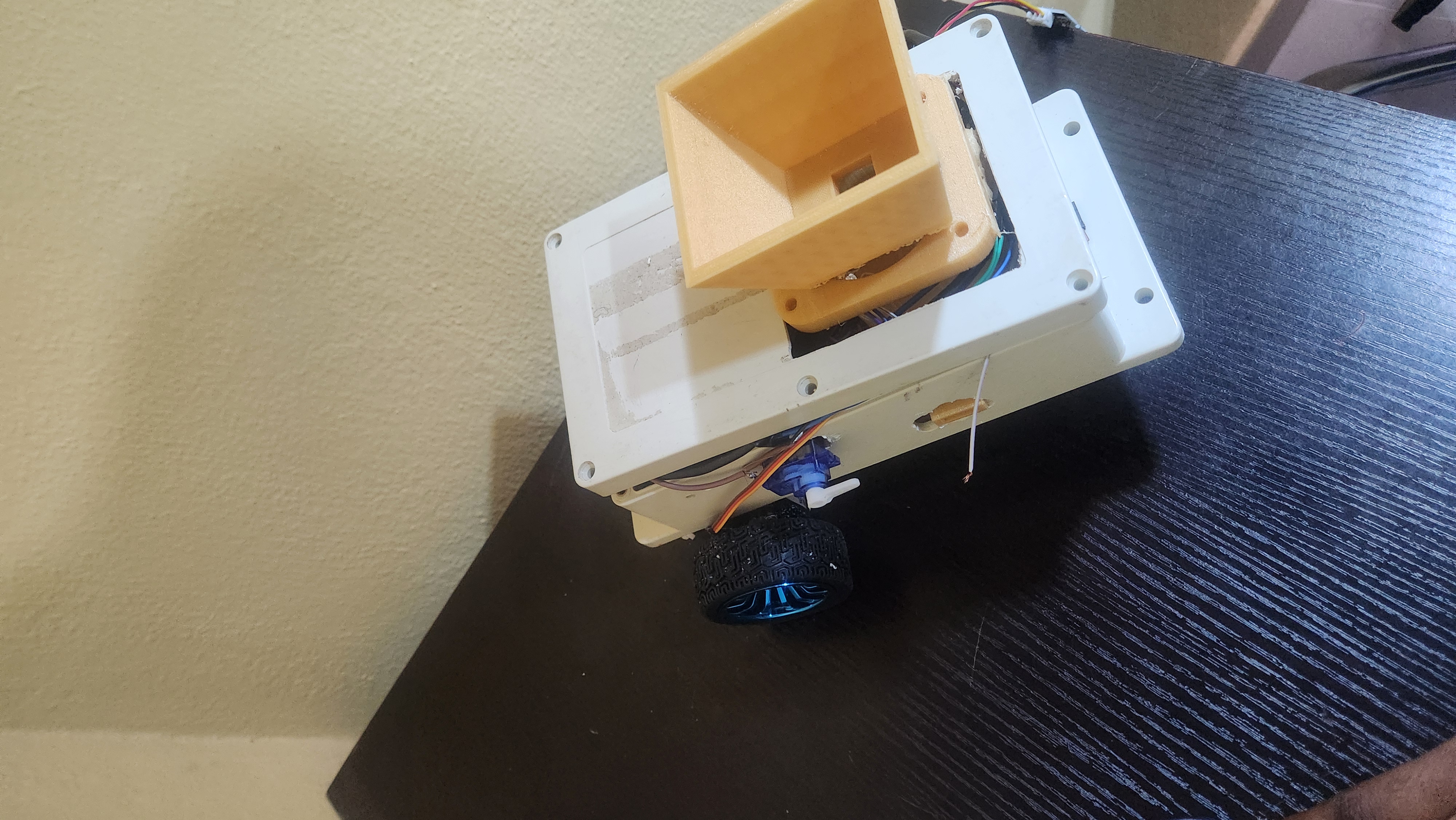
The robot is built on a three-wheeled box chassis. Two driven wheels are mounted at the rear of the chassis and one free-rolling wheel at the front provides balance and directional support. The box structure provides a rigid and enclosed platform for mounting all electronics, the battery pack and the fertilizer hopper securely above the chassis floor.
### Fertilizer Hopper and Auger
The fertilizer hopper is mounted on top of the box chassis. Inside the hopper, an auger — a helical screw mechanism — rotates to push fertilizer downward through a nozzle at the base. The dispensing rate is controlled by varying the auger motor speed through PWM. A higher duty cycle means faster rotation and more fertilizer dispensed per unit time.
### Soil Sensor Insertion Mechanism
A servo motor is connected to a crank-slider linkage. When the robot stops at a zone, the servo rotates through a set angle, converting rotary motion into linear motion that pushes the sensor probe vertically downward into the soil. After a stable reading is obtained, the servo retracts the probe and the robot proceeds to the next zone.
---
## Power System
The robot is powered by a custom assembled 3S2P lithium-ion battery pack consisting of six 18650 cells.
**Pack Specification:**
| Parameter | Value |
|---|---|
| Configuration | 3 Series, 2 Parallel |
| Nominal Voltage | 11.1V |
| Full Charge Voltage | 12.6V |
| Capacity | ~6000mAh |
| Protection | 3S BMS |
**Power Distribution:**
```
Battery Pack (11.1V)
│
▼
3S BMS
│
├──────────────────► BTS7960 Motor Driver (11.1V) ──► Drive Motors
│
└──► LM7805 Regulator (5V out)
│
├──► ESP32
├──► Servo Motor
├──► NPK Sensor
├──► Moisture Sensor
└──► HC-SR04
```
---
## Software and Firmware
### ESP32 Firmware
The ESP32 firmware is written in C++ using the Arduino framework. It handles the following tasks:
- Reading NPK values from the soil sensor over UART using RS485
- Reading moisture levels from the capacitive sensor via ADC
- Measuring distance using the HC-SR04 for obstacle avoidance
- Generating PWM signals for drive motor speed control via the BTS7960
- Controlling the servo motor for soil probe insertion and retraction
- Publishing all sensor data as JSON payloads over MQTT via WiFi
**Fertilizer Rate Algorithm**
The fertilizer application rate is calculated based on soil moisture content using the following logic:
- Soil moisture at or below wilting point → maximum application rate
- Soil moisture at field capacity → minimum application rate
- Values between wilting point and field capacity → linearly scaled rate
NPK deficiency values from the sensor are used as secondary modifiers to further adjust the rate upward if critical nutrients are below threshold.
### Firmware Code
```cpp
#include <WiFi.h>
#include <PubSubClient.h>
#include <TinyGPSPlus.h>
#include <HardwareSerial.h>
#include <ArduinoJson.h>
#include <ESP32Servo.h>
const char* WIFI_SSID = "YOUR_WIFI_SSID";
const char* WIFI_PASSWORD = "YOUR_WIFI_PASSWORD";
const char* MQTT_BROKER = "YOUR_MQTT_BROKER_IP";
const int MQTT_PORT = 1883;
const char* MQTT_CLIENT_ID = "fertilizer_robot_01";
const char* TOPIC_SOIL = "robot/soil";
const char* TOPIC_GPS = "robot/gps";
const char* TOPIC_FERTILIZER = "robot/fertilizer";
const char* TOPIC_BATTERY = "robot/battery";
const char* TOPIC_STATUS = "robot/status";
const char* TOPIC_CONFIG = "robot/config";
const char* TOPIC_ROW = "robot/row";
#define MOTOR_LEFT_IN1 18
#define MOTOR_LEFT_IN2 19
#define MOTOR_RIGHT_IN1 21
#define MOTOR_RIGHT_IN2 22
#define MOTOR_LEFT_ENA 25
#define MOTOR_RIGHT_ENB 26
#define ENCODER_LEFT 34
#define ENCODER_RIGHT 35
#define RELAY_AUGER 27
#define SERVO_PIN 14
#define ULTRASONIC_TRIG 32
#define ULTRASONIC_ECHO 33
#define IR_SENSOR_PIN 23
#define MOISTURE_PIN 36
#define BATTERY_PIN 39
#define MOISTURE_DRY 2800
#define MOISTURE_WET 1200
struct CropConfig {
String cropType = "corn";
float intervalMeters = 0.75;
float baseRateGrams = 50.0;
};
struct FieldConfig {
float rowLengthMeters = 20.0;
float rowSpacingMeters = 0.75;
int totalRows = 6;
double rowStartLat = 0.0;
double rowStartLng = 0.0;
double rowEndLat = 0.0;
double rowEndLng = 0.0;
bool useGPSWaypoints = false;
};
CropConfig cropConfig;
FieldConfig fieldConfig;
float getCropInterval(String crop) {
if (crop == "corn") return 0.75;
if (crop == "soybean") return 0.50;
if (crop == "wheat") return 0.10;
return 0.75;
}
int currentRow = 1;
bool movingForward = true;
bool rowEndDetected = false;
bool uTurnInProgress = false;
volatile long leftPulses = 0;
volatile long rightPulses = 0;
const float WHEEL_DIAMETER_M = 0.065;
const int PULSES_PER_REV = 20; // JGB37-520 encoder — confirm with your spec sheet
const float WHEEL_CIRCUMFERENCE = PI * WHEEL_DIAMETER_M;
const float METERS_PER_PULSE = WHEEL_CIRCUMFERENCE / PULSES_PER_REV;
float totalDistanceTravelled = 0.0;
float distanceSinceLastStop = 0.0;
float distanceInCurrentRow = 0.0;
float uTurnDistanceTravelled = 0.0;
void IRAM_ATTR leftEncoderISR() { leftPulses++; }
void IRAM_ATTR rightEncoderISR() { rightPulses++; }
float getPulseDistance() {
long pulses = (leftPulses + rightPulses) / 2;
leftPulses = 0;
rightPulses = 0;
return pulses * METERS_PER_PULSE;
}
enum RobotState {
STATE_IDLE,
STATE_MOVING,
STATE_SENSING,
STATE_DISPENSING,
STATE_ROW_END_STOP,
STATE_UTURN_TURNING_1,
STATE_UTURN_STEPPING,
STATE_UTURN_TURNING_2,
STATE_FIELD_COMPLETE,
STATE_OBSTACLE_DETECTED,
STATE_ERROR
};
RobotState robotState = STATE_IDLE;
unsigned long lastDistanceCheck = 0;
unsigned long lastBatteryCheck = 0;
unsigned long lastGPSPublish = 0;
unsigned long lastStatusPublish = 0;
unsigned long sensingStartTime = 0;
unsigned long dispensingStart = 0;
unsigned long turnStartTime = 0;
unsigned long rowEndPauseStart = 0;
const unsigned long DISTANCE_CHECK_INTERVAL = 100;
const unsigned long BATTERY_CHECK_INTERVAL = 10000;
const unsigned long GPS_PUBLISH_INTERVAL = 2000;
const unsigned long STATUS_PUBLISH_INTERVAL = 5000;
const unsigned long SENSING_DURATION = 3000;
const unsigned long DISPENSING_DURATION = 2000;
const unsigned long ROW_END_PAUSE = 1000;
const unsigned long TURN_90_DURATION = 800;
struct SoilData {
int moisture = 0;
float nitrogen = 0;
float phosphorus = 0;
float potassium = 0;
};
SoilData soilData;
float fertilizerDispensedGrams = 0.0;
float totalFertilizerGrams = 0.0;
TinyGPSPlus gps;
HardwareSerial gpsSerial(1); // UART1 — GPIO9(RX), GPIO10(TX)
Servo soilServo;
WiFiClient wifiClient;
PubSubClient mqttClient(wifiClient);
double gpsDistanceTo(double lat1, double lng1, double lat2, double lng2) {
return TinyGPSPlus::distanceBetween(lat1, lng1, lat2, lng2);
}
bool nearGPSWaypoint(double targetLat, double targetLng, float thresholdMeters = 1.5) {
if (!gps.location.isValid()) return false;
double dist = gpsDistanceTo(
gps.location.lat(), gps.location.lng(),
targetLat, targetLng
);
return dist <= thresholdMeters;
}
bool checkRowEnd() {
if (digitalRead(IR_SENSOR_PIN) == LOW) {
Serial.println("Row end: IR marker detected");
return true;
}
if (fieldConfig.useGPSWaypoints &&
fieldConfig.rowEndLat != 0.0 &&
nearGPSWaypoint(fieldConfig.rowEndLat, fieldConfig.rowEndLng)) {
Serial.println("Row end: GPS waypoint reached");
return true;
}
if (distanceInCurrentRow >= fieldConfig.rowLengthMeters) {
Serial.println("Row end: encoder distance reached");
return true;
}
return false;
}
void mqttCallback(char* topic, byte* payload, unsigned int length) {
String msg = "";
for (int i = 0; i < length; i++) msg += (char)payload[i];
StaticJsonDocument<512> doc;
DeserializationError err = deserializeJson(doc, msg);
if (err) return;
if (String(topic) == TOPIC_CONFIG) {
if (doc.containsKey("crop_type")) {
cropConfig.cropType = doc["crop_type"].as<String>();
cropConfig.intervalMeters = getCropInterval(cropConfig.cropType);
}
if (doc.containsKey("base_rate_grams"))
cropConfig.baseRateGrams = doc["base_rate_grams"];
if (doc.containsKey("row_length_m"))
fieldConfig.rowLengthMeters = doc["row_length_m"];
if (doc.containsKey("row_spacing_m"))
fieldConfig.rowSpacingMeters = doc["row_spacing_m"];
if (doc.containsKey("total_rows"))
fieldConfig.totalRows = doc["total_rows"];
if (doc.containsKey("row_end_lat") && doc.containsKey("row_end_lng")) {
fieldConfig.rowEndLat = doc["row_end_lat"];
fieldConfig.rowEndLng = doc["row_end_lng"];
fieldConfig.useGPSWaypoints = true;
}
Serial.println("Config updated from dashboard");
Serial.println(" Crop: " + cropConfig.cropType);
Serial.println(" Row length: " + String(fieldConfig.rowLengthMeters) + "m");
Serial.println(" Total rows: " + String(fieldConfig.totalRows));
if (robotState == STATE_IDLE) {
robotState = STATE_MOVING;
moveForward();
publishStatus("started");
}
}
}
void connectWiFi() {
Serial.print("Connecting to WiFi");
WiFi.begin(WIFI_SSID, WIFI_PASSWORD);
while (WiFi.status() != WL_CONNECTED) {
delay(500);
Serial.print(".");
}
Serial.println("\nWiFi connected: " + WiFi.localIP().toString());
}
void connectMQTT() {
mqttClient.setServer(MQTT_BROKER, MQTT_PORT);
mqttClient.setCallback(mqttCallback);
Serial.print("Connecting to MQTT");
while (!mqttClient.connected()) {
if (mqttClient.connect(MQTT_CLIENT_ID)) {
Serial.println("\nMQTT connected");
mqttClient.subscribe(TOPIC_CONFIG);
mqttClient.publish(TOPIC_STATUS, "{\"status\":\"robot_online\"}");
} else {
Serial.print(".");
delay(1000);
}
}
}
void reconnectMQTT() {
if (!mqttClient.connected()) connectMQTT();
}
void moveForward(int speed = 200) {
analogWrite(MOTOR_LEFT_ENA, speed);
analogWrite(MOTOR_RIGHT_ENB, speed);
digitalWrite(MOTOR_LEFT_IN1, HIGH);
digitalWrite(MOTOR_LEFT_IN2, LOW);
digitalWrite(MOTOR_RIGHT_IN1, HIGH);
digitalWrite(MOTOR_RIGHT_IN2, LOW);
}
void stopMotors() {
analogWrite(MOTOR_LEFT_ENA, 0);
analogWrite(MOTOR_RIGHT_ENB, 0);
digitalWrite(MOTOR_LEFT_IN1, LOW);
digitalWrite(MOTOR_LEFT_IN2, LOW);
digitalWrite(MOTOR_RIGHT_IN1, LOW);
digitalWrite(MOTOR_RIGHT_IN2, LOW);
}
void turnRight(int speed = 180) {
analogWrite(MOTOR_LEFT_ENA, speed);
analogWrite(MOTOR_RIGHT_ENB, speed);
digitalWrite(MOTOR_LEFT_IN1, HIGH);
digitalWrite(MOTOR_LEFT_IN2, LOW);
digitalWrite(MOTOR_RIGHT_IN1, LOW);
digitalWrite(MOTOR_RIGHT_IN2, HIGH);
}
void turnLeft(int speed = 180) {
analogWrite(MOTOR_LEFT_ENA, speed);
analogWrite(MOTOR_RIGHT_ENB, speed);
digitalWrite(MOTOR_LEFT_IN1, LOW);
digitalWrite(MOTOR_LEFT_IN2, HIGH);
digitalWrite(MOTOR_RIGHT_IN1, HIGH);
digitalWrite(MOTOR_RIGHT_IN2, LOW);
}
void startTurn() {
if (currentRow % 2 != 0) turnRight();
else turnLeft();
}
void startReverseTurn() {
if (currentRow % 2 != 0) turnLeft();
else turnRight();
}
void augerOn() { digitalWrite(RELAY_AUGER, LOW); } // LOW = relay ON
void augerOff() { digitalWrite(RELAY_AUGER, HIGH); } // HIGH = relay OFF
float getUltrasonicDistance() {
digitalWrite(ULTRASONIC_TRIG, LOW);
delayMicroseconds(2);
digitalWrite(ULTRASONIC_TRIG, HIGH);
delayMicroseconds(10);
digitalWrite(ULTRASONIC_TRIG, LOW);
long dur = pulseIn(ULTRASONIC_ECHO, HIGH, 30000);
return (dur * 0.034) / 2.0;
}
bool obstacleDetected() {
float dist = getUltrasonicDistance();
return (dist > 0 && dist < 30.0);
}
void readMoisture() {
int raw = analogRead(MOISTURE_PIN);
int moisture = map(raw, MOISTURE_DRY, MOISTURE_WET, 0, 100);
soilData.moisture = constrain(moisture, 0, 100);
Serial.print("Moisture raw: "); Serial.print(raw);
Serial.print(" -> "); Serial.print(soilData.moisture); Serial.println("%");
}
void readNPK() {
byte query[] = {0x01, 0x03, 0x00, 0x1E, 0x00, 0x03, 0x65, 0xCD};
Serial2.write(query, sizeof(query));
delay(200);
if (Serial2.available() >= 11) {
byte response[11];
Serial2.readBytes(response, 11);
// Validate response: check address and function code
if (response[0] == 0x01 && response[1] == 0x03) {
soilData.nitrogen = ((response[3] << 8) | response[4]);
soilData.phosphorus = ((response[5] << 8) | response[6]);
soilData.potassium = ((response[7] << 8) | response[8]);
Serial.print("N:"); Serial.print(soilData.nitrogen);
Serial.print(" P:"); Serial.print(soilData.phosphorus);
Serial.print(" K:"); Serial.println(soilData.potassium);
} else {
Serial.println("NPK: bad response — check wiring or baud rate");
}
} else {
Serial.println("NPK: no response — check SH-U12 connections");
}
}
float calculateFertilizerRate() {
float moistureFactor = 1.0;
if (soilData.moisture < 30) moistureFactor = 1.5;
else if (soilData.moisture < 50) moistureFactor = 1.2;
else if (soilData.moisture < 70) moistureFactor = 1.0;
else moistureFactor = 0.7;
return cropConfig.baseRateGrams * moistureFactor;
}
float getBatteryPercent() {
int raw = analogRead(BATTERY_PIN);
float volts = (raw / 4095.0) * 3.3 * 4.0;
float pct = ((volts - 9.0) / (12.6 - 9.0)) * 100.0;
return constrain(pct, 0.0, 100.0);
}
void publishSoilData() {
StaticJsonDocument<256> doc;
doc["moisture"] = soilData.moisture;
doc["nitrogen"] = soilData.nitrogen;
doc["phosphorus"] = soilData.phosphorus;
doc["potassium"] = soilData.potassium;
doc["row"] = currentRow;
if (gps.location.isValid()) {
doc["lat"] = gps.location.lat();
doc["lng"] = gps.location.lng();
}
char buf[256];
serializeJson(doc, buf);
mqttClient.publish(TOPIC_SOIL, buf);
}
void publishFertilizerData(float grams) {
StaticJsonDocument<256> doc;
doc["dispensed_grams"] = grams;
doc["total_grams"] = totalFertilizerGrams;
doc["distance_m"] = totalDistanceTravelled;
doc["row"] = currentRow;
doc["crop_type"] = cropConfig.cropType;
if (gps.location.isValid()) {
doc["lat"] = gps.location.lat();
doc["lng"] = gps.location.lng();
}
char buf[256];
serializeJson(doc, buf);
mqttClient.publish(TOPIC_FERTILIZER, buf);
}
void publishGPS() {
if (!gps.location.isValid()) return;
StaticJsonDocument<128> doc;
doc["lat"] = gps.location.lat();
doc["lng"] = gps.location.lng();
doc["speed_kmh"] = gps.speed.kmph();
doc["row"] = currentRow;
char buf[128];
serializeJson(doc, buf);
mqttClient.publish(TOPIC_GPS, buf);
}
void publishBattery() {
StaticJsonDocument<64> doc;
doc["battery_pct"] = getBatteryPercent();
char buf[64];
serializeJson(doc, buf);
mqttClient.publish(TOPIC_BATTERY, buf);
}
void publishStatus(String status) {
StaticJsonDocument<200> doc;
doc["status"] = status;
doc["state"] = (int)robotState;
doc["distance_m"] = totalDistanceTravelled;
doc["current_row"] = currentRow;
doc["total_rows"] = fieldConfig.totalRows;
doc["moving_forward"] = movingForward;
char buf[200];
serializeJson(doc, buf);
mqttClient.publish(TOPIC_STATUS, buf);
}
void publishRowEvent(String event) {
StaticJsonDocument<128> doc;
doc["event"] = event;
doc["row"] = currentRow;
doc["total_rows"] = fieldConfig.totalRows;
if (gps.location.isValid()) {
doc["lat"] = gps.location.lat();
doc["lng"] = gps.location.lng();
}
char buf[128];
serializeJson(doc, buf);
mqttClient.publish(TOPIC_ROW, buf);
}
void setup() {
Serial.begin(115200);
pinMode(MOTOR_LEFT_IN1, OUTPUT);
pinMode(MOTOR_LEFT_IN2, OUTPUT);
pinMode(MOTOR_RIGHT_IN1, OUTPUT);
pinMode(MOTOR_RIGHT_IN2, OUTPUT);
pinMode(MOTOR_LEFT_ENA, OUTPUT);
pinMode(MOTOR_RIGHT_ENB, OUTPUT);
pinMode(RELAY_AUGER, OUTPUT);
augerOff();
pinMode(ULTRASONIC_TRIG, OUTPUT);
pinMode(ULTRASONIC_ECHO, INPUT);
pinMode(IR_SENSOR_PIN, INPUT_PULLUP);
pinMode(ENCODER_LEFT, INPUT_PULLUP);
pinMode(ENCODER_RIGHT, INPUT_PULLUP);
attachInterrupt(digitalPinToInterrupt(ENCODER_LEFT), leftEncoderISR, RISING);
attachInterrupt(digitalPinToInterrupt(ENCODER_RIGHT), rightEncoderISR, RISING);
soilServo.attach(SERVO_PIN);
soilServo.write(0); // retracted at boot
gpsSerial.begin(9600, SERIAL_8N1, 9,10)
Serial2.begin(9600, SERIAL_8N1, 16, 17);
connectWiFi();
connectMQTT();
robotState = STATE_IDLE;
Serial.println("Robot online. Waiting for field config from dashboard...");
}
void loop() {
reconnectMQTT();
mqttClient.loop();
while (gpsSerial.available()) gps.encode(gpsSerial.read());
unsigned long now = millis();
if (now - lastGPSPublish >= GPS_PUBLISH_INTERVAL) {
lastGPSPublish = now;
publishGPS();
}
if (now - lastBatteryCheck >= BATTERY_CHECK_INTERVAL) {
lastBatteryCheck = now;
publishBattery();
}
if (now - lastStatusPublish >= STATUS_PUBLISH_INTERVAL) {
lastStatusPublish = now;
publishStatus("running");
}
switch (robotState) {
case STATE_IDLE:
break;
case STATE_MOVING: {
if (obstacleDetected()) {
stopMotors();
robotState = STATE_OBSTACLE_DETECTED;
publishStatus("obstacle_detected");
break;
}
if (now - lastDistanceCheck >= DISTANCE_CHECK_INTERVAL) {
lastDistanceCheck = now;
float delta = getPulseDistance();
distanceSinceLastStop += delta;
distanceInCurrentRow += delta;
totalDistanceTravelled += delta;
}
if (checkRowEnd()) {
stopMotors();
augerOff();
rowEndPauseStart = now;
robotState = STATE_ROW_END_STOP;
publishRowEvent("row_end_reached");
Serial.println("Row " + String(currentRow) + " complete — preparing U-turn");
break;
}
if (distanceSinceLastStop >= cropConfig.intervalMeters) {
stopMotors();
distanceSinceLastStop = 0.0;
robotState = STATE_SENSING;
sensingStartTime = now;
soilServo.write(90); // insert sensor into soil
}
break;
}
case STATE_SENSING: {
if (now - sensingStartTime >= SENSING_DURATION) {
readMoisture();
readNPK();
publishSoilData();
soilServo.write(0);
fertilizerDispensedGrams = calculateFertilizerRate();
totalFertilizerGrams += fertilizerDispensedGrams;
augerOn();
dispensingStart = now;
robotState = STATE_DISPENSING;
}
break;
}
case STATE_DISPENSING: {
if (now - dispensingStart >= DISPENSING_DURATION) {
augerOff();
publishFertilizerData(fertilizerDispensedGrams);
robotState = STATE_MOVING;
moveForward();
}
break;
}
case STATE_ROW_END_STOP: {
if (now - rowEndPauseStart >= ROW_END_PAUSE) {
if (currentRow >= fieldConfig.totalRows) {
robotState = STATE_FIELD_COMPLETE;
publishStatus("field_complete");
publishRowEvent("field_complete");
Serial.println("All rows complete! Mission finished.");
break;
}
startTurn();
turnStartTime = now;
robotState = STATE_UTURN_TURNING_1;
Serial.println("U-turn started — turn 1");
}
break;
}
case STATE_UTURN_TURNING_1: {
if (now - turnStartTime >= TURN_90_DURATION) {
stopMotors();
uTurnDistanceTravelled = 0.0;
leftPulses = 0;
rightPulses = 0;
moveForward();
robotState = STATE_UTURN_STEPPING;
Serial.println("U-turn — stepping across to next row");
}
break;
}
case STATE_UTURN_STEPPING: {
if (now - lastDistanceCheck >= DISTANCE_CHECK_INTERVAL) {
lastDistanceCheck = now;
float delta = getPulseDistance();
uTurnDistanceTravelled += delta;
}
if (uTurnDistanceTravelled >= fieldConfig.rowSpacingMeters) {
stopMotors();
startReverseTurn();
turnStartTime = now;
robotState = STATE_UTURN_TURNING_2;
Serial.println("U-turn — turn 2 to align with next row");
}
break;
}
case STATE_UTURN_TURNING_2: {
if (now - turnStartTime >= TURN_90_DURATION) {
stopMotors();
currentRow++;
movingForward = !movingForward;
distanceInCurrentRow = 0.0;
distanceSinceLastStop = 0.0;
moveForward();
robotState = STATE_MOVING;
publishRowEvent("new_row_started");
Serial.println("Now on row " + String(currentRow) + " — moving");
}
break;
}
case STATE_FIELD_COMPLETE: {
stopMotors();
augerOff();
static bool finalPublished = false;
if (!finalPublished) {
StaticJsonDocument<200> doc;
doc["event"] = "mission_complete";
doc["total_rows"] = fieldConfig.totalRows;
doc["total_distance_m"] = totalDistanceTravelled;
doc["total_fertilizer_g"] = totalFertilizerGrams;
char buf[200];
serializeJson(doc, buf);
mqttClient.publish(TOPIC_STATUS, buf);
finalPublished = true;
Serial.println("Mission summary published.");
}
break;
}
case STATE_OBSTACLE_DETECTED: {
if (!obstacleDetected()) {
robotState = STATE_MOVING;
moveForward();
publishStatus("obstacle_cleared");
Serial.println("Obstacle cleared — resuming");
}
break;
}
case STATE_ERROR:
default:
stopMotors();
augerOff();
break;
}
}
## Web Dashboard
The web dashboard is built using React with Leaflet for map visualisation and MQTT.js for real-time data communication.
**Dashboard Features:**
| Feature | Description |
|---|---|
| Live GPS Trail | Shows the robot's path across the field on a map |
| Soil Metrics Panel | Displays real-time NPK and moisture readings per zone |
| Fertilizer Rate Display | Shows calculated and applied rate per zone |
| Obstacle Alerts | Notifies operator when an obstacle is detected |
| Zone Data Table | Logs all zone readings in a structured table |
| CSV Export | Allows farmer to download field data as a spreadsheet |
### Dashboard Code
```html,css, javascript
<!DOCTYPE html>
<html lang="en">
<head>
<meta charset="UTF-8" />
<meta name="viewport" content="width=device-width, initial-scale=1.0" />
<title>Fertilizer Robot Dashboard</title>
<link rel="preconnect" href="https://fonts.googleapis.com">
<link rel="preconnect" href="https://fonts.gstatic.com" crossorigin>
<link href="https://fonts.googleapis.com/css2?family=Inter:wght@400;500;600;700&display=swap" rel="stylesheet">
<link rel="stylesheet" href="https://unpkg.com/leaflet/dist/leaflet.css" />
<style>
:root {
--bg: #0b1a0f;
--panel: rgba(255, 255, 255, 0.16);
--panel-strong: rgba(255, 255, 255, 0.22);
--text: #eef6e9;
--muted: #aacfa5;
--accent: #72c78f;
--accent-soft: rgba(114, 199, 143, 0.22);
--success: #a8f0a6;
--warning: #ffda92;
--danger: #ff9ea9;
--glass: rgba(255,255,255,0.10);
}
* {
box-sizing: border-box;
}
body {
margin: 0;
min-height: 100vh;
font-family: 'Inter', sans-serif;
color: var(--text);
background: linear-gradient(180deg, rgba(8, 24, 12, 0.84), rgba(6, 18, 6, 0.94)),
url('https://images.unsplash.com/photo-1501004318641-b39e6451bec6?auto=format&fit=crop&w=1600&q=80') center/cover no-repeat;
background-attachment: fixed;
background-blend-mode: overlay;
overflow-x: hidden;
}
.page {
max-width: 1280px;
margin: 0 auto;
padding: 30px 24px 40px;
background: rgba(8, 24, 12, 0.72);
border: 1px solid rgba(255,255,255,0.08);
border-radius: 36px;
box-shadow: 0 40px 120px rgba(3, 10, 3, 0.45);
}
.hero {
display: flex;
flex-wrap: wrap;
align-items: flex-start;
justify-content: space-between;
gap: 20px;
margin-bottom: 30px;
}
.hero-text {
max-width: 680px;
}
.hero-text h1 {
margin: 0;
font-size: clamp(2.6rem, 4vw, 4.3rem);
line-height: 1.05;
letter-spacing: -0.04em;
color: #f1f9ea;
}
.hero-text p {
margin: 18px 0 0;
max-width: 610px;
color: var(--muted);
font-size: 1rem;
line-height: 1.75;
}
.status-pill {
display: inline-flex;
align-items: center;
gap: 10px;
padding: 14px 18px;
border-radius: 999px;
border: 1px solid rgba(168, 240, 166, 0.24);
backdrop-filter: blur(16px);
background: rgba(18, 44, 20, 0.72);
color: var(--text);
font-weight: 600;
box-shadow: 0 20px 80px rgba(0, 0, 0, 0.22);
}
.status-pill .dot {
width: 12px;
height: 12px;
border-radius: 50%;
background: var(--success);
box-shadow: 0 0 0 6px rgba(168, 240, 166, 0.18);
}
.grid {
display: grid;
grid-template-columns: repeat(12, minmax(0, 1fr));
gap: 18px;
}
.card {
grid-column: span 12;
background: linear-gradient(180deg, rgba(255, 255, 255, 0.14), rgba(172, 246, 174, 0.08));
border: 1px solid rgba(183, 255, 198, 0.14);
border-radius: 28px;
padding: 24px;
backdrop-filter: blur(18px);
box-shadow: 0 28px 80px rgba(4, 12, 8, 0.28);
position: relative;
overflow: hidden;
}
.card::before {
content: '';
position: absolute;
inset: 0;
background: radial-gradient(circle at top right, rgba(166, 255, 190, 0.24), transparent 34%),
radial-gradient(circle at bottom left, rgba(103, 219, 118, 0.18), transparent 30%);
pointer-events: none;
}
.card::after {
content: '';
position: absolute;
top: 0;
left: 22px;
width: calc(100% - 44px);
height: 5px;
border-radius: 999px;
background: linear-gradient(90deg, #9ce79a, #b4fff2);
opacity: 0.95;
pointer-events: none;
}
.card.accent-blue::after { background: linear-gradient(90deg, #7cd9ac, #9bffc8); }
.card.accent-green::after { background: linear-gradient(90deg, #8ff3c6, #a5ffdb); }
.card.accent-peach::after { background: linear-gradient(90deg, #ffe6ac, #ffd3c1); }
.card.accent-lavender::after { background: linear-gradient(90deg, #c8e0ff, #b2ccff); }
.card.accent-mint::after { background: linear-gradient(90deg, #c7ffc9, #d6ffe5); }
.card h2 {
margin: 0 0 18px;
font-size: 1.15rem;
letter-spacing: 0.01em;
}
.card .value {
font-size: clamp(2rem, 3vw, 3.2rem);
font-weight: 700;
margin: 0;
line-height: 1;
color: var(--text);
}
.card .label {
margin-top: 10px;
color: var(--muted);
font-size: 0.95rem;
}
.small-grid {
display: grid;
grid-template-columns: repeat(12, minmax(0, 1fr));
gap: 18px;
}
.card.small {
grid-column: span 6;
}
.card.large {
grid-column: span 8;
}
.map-container {
height: 380px;
border-radius: 24px;
border: 1px solid rgba(255,255,255,0.14);
overflow: hidden;
box-shadow: inset 0 0 0 1px rgba(255,255,255,0.05);
margin-bottom: 16px;
}
.alert-card {
display: flex;
align-items: flex-start;
gap: 18px;
padding: 22px;
border: 1px solid rgba(255, 167, 196, 0.35);
background: rgba(255, 167, 196, 0.16);
color: #fff;
border-radius: 24px;
}
.alert-card p {
margin: 0;
font-weight: 600;
line-height: 1.5;
}
.alert-card .badge {
display: inline-flex;
align-items: center;
gap: 8px;
padding: 8px 12px;
border-radius: 999px;
background: rgba(255, 93, 119, 0.22);
color: #ffdce3;
font-size: 0.95rem;
font-weight: 700;
}
.alerts-list {
margin: 16px 0 0;
padding: 0;
list-style: none;
display: grid;
gap: 12px;
}
.alert-message {
display: flex;
align-items: center;
gap: 12px;
padding: 14px 16px;
border-radius: 18px;
background: rgba(11, 50, 23, 0.75);
border: 1px solid rgba(168, 240, 166, 0.18);
color: #eef6e9;
font-size: 0.96rem;
line-height: 1.5;
}
.alert-dot {
width: 14px;
height: 14px;
border-radius: 50%;
flex-shrink: 0;
background: #ffbd61;
box-shadow: 0 0 0 4px rgba(255, 189, 97, 0.18);
}
.bar-chart {
display: grid;
gap: 12px;
min-height: 180px;
padding: 12px 0;
}
.bar-item {
display: grid;
grid-template-columns: minmax(140px, 220px) 1fr auto;
align-items: center;
gap: 14px;
padding: 10px 0;
border-bottom: 1px solid rgba(255,255,255,0.08);
}
.bar-label {
font-size: 0.95rem;
color: var(--text);
min-width: 120px;
}
.bar-fill {
position: relative;
height: 18px;
border-radius: 999px;
background: rgba(255,255,255,0.08);
overflow: hidden;
}
.bar-fill span {
display: block;
height: 100%;
width: 0;
border-radius: 999px;
background: linear-gradient(90deg, #7cd9ac, #52b96b);
transition: width 0.5s ease;
}
.bar-value {
font-size: 0.95rem;
color: var(--muted);
min-width: 50px;
text-align: right;
}
.bar-placeholder {
padding: 24px;
border-radius: 20px;
background: rgba(255,255,255,0.04);
color: rgba(255,255,255,0.75);
font-size: 0.95rem;
text-align: center;
}
.session-list {
margin: 0;
padding: 0;
list-style: none;
display: grid;
gap: 14px;
}
.session-item {
display: grid;
grid-template-columns: 1fr auto;
gap: 14px;
padding: 18px 20px;
border-radius: 20px;
background: rgba(255,255,255,0.06);
border: 1px solid rgba(255,255,255,0.08);
}
.session-item strong {
font-size: 0.98rem;
margin-bottom: 6px;
display: block;
color: var(--text);
}
.session-item span {
color: var(--muted);
font-size: 0.92rem;
line-height: 1.5;
}
.placeholder {
color: rgba(255,255,255,0.5);
border: 1px dashed rgba(255,255,255,0.2);
min-height: 130px;
display: flex;
align-items: center;
justify-content: center;
text-align: center;
font-size: 0.96rem;
padding: 18px;
background: rgba(255,255,255,0.02);
}
.field-select {
width: 100%;
margin-top: 10px;
padding: 14px 16px;
border-radius: 16px;
border: 1px solid rgba(255,255,255,0.18);
background: rgba(255,255,255,0.08);
color: var(--text);
font-size: 0.98rem;
outline: none;
}
.field-select option {
color: #111827;
}
@media (max-width: 900px) {
.card.small,
.card.large {
grid-column: span 12;
}
}
@media (max-width: 700px) {
.page {
padding: 20px 16px 30px;
}
.hero {
flex-direction: column;
align-items: stretch;
}
.status-pill {
width: 100%;
justify-content: center;
}
.small-grid {
grid-template-columns: 1fr;
}
.session-item {
grid-template-columns: 1fr;
}
.card .value {
font-size: 2.2rem;
}
}
</style>
</head>
<body>
<div class="page">
<section class="hero">
<div class="hero-text">
<h1>Fertilizer Robot Growth Dashboard</h1>
<p>Track your robot, soil health, and fertilizer delivery in a plant-inspired dashboard with a live interactive field map.</p>
</div>
<div class="status-pill" id="connectionStatus">
<span class="dot"></span>
<span>Connecting to MQTT...</span>
</div>
</section>
<div class="grid">
<article class="card accent-blue" style="grid-column: span 12;">
<h2>Live Sensor Snapshot</h2>
<div class="small-grid">
<div class="card small">
<h2>Soil EC</h2>
<p class="value" id="soilEcValue">--</p>
<p class="label">Nutrient conductivity in µS/cm</p>
</div>
<div class="card small">
<h2>Soil Moisture</h2>
<p class="value" id="soilMoistureValue">--</p>
<p class="label">Moisture level as percentage</p>
</div>
</div>
</article>
<article class="card large accent-blue" style="grid-column: span 12;">
<h2>Live Robot Tracking Map</h2>
<div id="fieldMap" class="map-container"></div>
<p class="label">This interactive map shows the robot's current location in the field and updates in real time from MQTT GPS messages.</p>
</article>
<article class="card large accent-green">
<h2>Robot Power & Fertilizer</h2>
<div class="small-grid">
<div class="card small">
<h2>Battery Status</h2>
<p class="value" id="batteryStatusValue">--</p>
<p class="label">Online power condition</p>
</div>
<div class="card small">
<h2>Charge Level</h2>
<p class="value" id="batteryChargeValue">--</p>
<p class="label">Percent charged</p>
</div>
<div class="card small">
<h2>Fertilizer Remaining</h2>
<p class="value" id="fertilizerRemainingValue">--</p>
<p class="label">Kilograms left in hopper</p>
</div>
<div class="card small">
<h2>Used Fertilizer</h2>
<p class="value" id="fertilizerUsedValue">--</p>
<p class="label">Cumulative kg applied</p>
</div>
</div>
</article>
<article class="card large accent-mint">
<h2>Crop Field Configuration</h2>
<p class="label">Choose the crop field type so the robot can adapt its travel distance and fertilizer application plan.</p>
<div class="small-grid">
<div class="card small">
<h2>Field Type</h2>
<select id="cropFieldType" class="field-select">
<option value="">Select crop field type</option>
<option value="Corn">Corn</option>
<option value="Vegetables">Vegetables</option>
<option value="Rice">Rice</option>
<option value="Orchard">Orchard</option>
<option value="Other">Other</option>
</select>
<p class="label">Different crop fields require different travel distances.</p>
</div>
<div class="card small">
<h2>Planned Run Distance</h2>
<p class="value" id="runDistanceValue">--</p>
<p class="label">Estimated meters based on the selected field type</p>
</div>
</div>
</article>
<article class="card accent-peach" id="alertCard">
<h2>Live System Alerts</h2>
<div class="alert-card">
<div>
<span class="badge">ALERTS</span>
<ul class="alerts-list" id="alertsList">
<li class="alert-message">
No alerts at the moment. All systems are operating normally.
</li>
</ul>
</div>
</div>
</article>
<article class="card large accent-lavender">
<h2>Recent Sessions</h2>
<p class="label">Past robot runs with date, time and field area covered.</p>
<ul class="session-list" id="sessionHistory">
<li class="session-item">
<strong>No past sessions received yet</strong>
<span>When MQTT messages arrive on the session topic, they will appear here.</span>
</li>
</ul>
</article>
<article class="card large accent-mint">
<h2>Fertilizer Dispensed Per Session</h2>
<div class="bar-chart" id="dispensedChart">
<div class="bar-placeholder">Session data will appear here once fertilizer dispense values arrive.</div>
</div>
</article>
<article class="card small accent-mint">
<h2>Future Topic Space</h2>
<div class="placeholder">
Add new sensors, alerts, field maps, or coverage reports here later.
</div>
</article>
<article class="card small">
<h2>Placeholder Metrics</h2>
<div class="placeholder">
Support new MQTT topics like pump flow, pH, weather, or spray pressure in future updates.
</div>
</article>
</div>
</div>
<script src="https://unpkg.com/mqtt/dist/mqtt.min.js"></script>
<script src="https://unpkg.com/leaflet/dist/leaflet.js"></script>
<script>
const host = 'broker.hivemq.com';
const port = 8000;
const path = '/mqtt';
const url = `ws://${host}:${port}${path}`;
const statusEl = document.getElementById('connectionStatus');
const statusDot = statusEl.querySelector('.dot');
const statusText = statusEl.querySelector('span');
const state = {
soilEC: '--',
soilMoisture: '--',
gpsLocation: '--',
fertilizerRemaining: '--',
fertilizerUsed: '--',
batteryCharge: '--',
batteryStatus: '--',
cropFieldType: '--',
runDistance: '--',
sessions: []
};
const map = L.map('fieldMap', {
center: [15.0, 78.0],
zoom: 6,
scrollWheelZoom: false,
zoomControl: true,
});
L.tileLayer('https://{s}.tile.openstreetmap.org/{z}/{x}/{y}.png', {
maxZoom: 19,
attribution: '© OpenStreetMap contributors',
}).addTo(map);
const robotMarker = L.marker([15.0, 78.0], {
title: 'Fertilizer Robot',
}).addTo(map);
function updateCard(id, value) {
document.getElementById(id).textContent = value;
}
function setStatus(status, color, label) {
statusDot.style.background = color;
statusDot.style.boxShadow = `0 0 0 6px ${color}33`;
statusText.textContent = label;
}
function parseGpsCoordinates(value) {
if (!value) return null;
if (typeof value === 'object' && value.lat && value.lon) {
return [Number(value.lat), Number(value.lon)];
}
const text = String(value).trim();
if (text.includes(',')) {
const parts = text.split(',').map(part => part.trim());
if (parts.length >= 2) {
const lat = Number(parts[0]);
const lon = Number(parts[1]);
if (!Number.isNaN(lat) && !Number.isNaN(lon)) {
return [lat, lon];
}
}
}
try {
const json = JSON.parse(text);
if (json.lat && json.lon) {
return [Number(json.lat), Number(json.lon)];
}
} catch (err) {
// not JSON
}
return null;
}
function updateMapLocation(gpsText) {
const coords = parseGpsCoordinates(gpsText);
if (!coords) return;
robotMarker.setLatLng(coords);
map.panTo(coords, { animate: true, duration: 0.9 });
}
function showAlert(message) {
const card = document.getElementById('alertCard');
card.style.display = 'block';
document.getElementById('alertText').textContent = message;
}
function hideAlert() {
document.getElementById('alertCard').style.display = 'none';
}
const activeAlerts = {};
function addSessionEntry(entry) {
const list = document.getElementById('sessionHistory');
if (state.sessions.length === 0) {
list.innerHTML = '';
}
const item = document.createElement('li');
item.className = 'session-item';
item.innerHTML = `
<div>
<strong>${entry.date || 'Unknown date'} • ${entry.time || 'Unknown time'}</strong>
<span>Field: ${entry.field || 'Unknown'} • Area: ${entry.area || entry.distance || '—'}</span>
</div>
<div>
<span>${entry.notes || 'Session recorded'}</span>
${entry.fertilizerDispensedKg != null ? `<div class="label">Fertilizer dispensed: ${entry.fertilizerDispensedKg} kg</div>` : ''}
</div>
`;
list.prepend(item);
renderDispensedChart();
}
function renderDispensedChart() {
const chart = document.getElementById('dispensedChart');
const tracked = state.sessions
.filter(entry => entry.fertilizerDispensedKg != null)
.slice(-6)
.reverse();
if (!tracked.length) {
chart.innerHTML = '<div class="bar-placeholder">Session data will appear here once fertilizer dispense values arrive.</div>';
return;
}
const maxDispense = Math.max(...tracked.map(entry => Number(entry.fertilizerDispensedKg) || 0), 1);
chart.innerHTML = tracked.map(entry => {
const value = Number(entry.fertilizerDispensedKg) || 0;
const width = Math.min(100, Math.round((value / maxDispense) * 100));
return `
<div class="bar-item">
<div class="bar-label">${entry.date || 'Session'} ${entry.time || ''}</div>
<div class="bar-fill"><span style="width:${width}%"></span></div>
<div class="bar-value">${value} kg</div>
</div>
`;
}).join('');
}
function refreshAlerts() {
const list = document.getElementById('alertsList');
const keys = Object.keys(activeAlerts);
if (!keys.length) {
list.innerHTML = `<li class="alert-message"><span class="alert-dot"></span> No alerts at the moment. All systems are operating normally.</li>`;
return;
}
list.innerHTML = keys.map(key => `
<li class="alert-message">
<span class="alert-dot"></span>
${activeAlerts[key]}
</li>
`).join('');
}
function setAlert(type, message) {
activeAlerts[type] = message;
refreshAlerts();
}
function clearAlert(type) {
delete activeAlerts[type];
refreshAlerts();
}
function updateMoistureAlerts(value) {
const numeric = Number(String(value).replace(/[^\d.-]/g, '').trim());
if (Number.isNaN(numeric)) return;
if (numeric <= 25) {
setAlert('dry', 'Land too dry — watering is needed soon.');
} else {
clearAlert('dry');
}
}
function updateFertilizerAlerts(value) {
const numeric = Number(String(value).replace(/[^\d.-]/g, '').trim());
if (Number.isNaN(numeric)) return;
if (numeric <= 10) {
setAlert('fertilizer', `Fertilizer low: only ${numeric} kg remaining.`);
} else {
clearAlert('fertilizer');
}
}
function addRobotAlert(message) {
setAlert(`robot-${message}`, message);
}
function updateDistanceForFieldType(type) {
const distanceMap = {
Corn: '120 m',
Vegetables: '80 m',
Rice: '150 m',
Orchard: '100 m',
Other: '90 m',
};
const distance = distanceMap[type] || '--';
state.cropFieldType = type || '--';
state.runDistance = distance;
updateCard('runDistanceValue', distance);
}
const cropFieldTypeSelect = document.getElementById('cropFieldType');
cropFieldTypeSelect.addEventListener('change', (event) => {
updateDistanceForFieldType(event.target.value);
});
function processMessage(topic, payload) {
let data = payload;
try {
data = JSON.parse(payload);
} catch (err) {
data = payload;
}
switch (topic) {
case 'soil/EC/nutrient level':
state.soilEC = `${data}`;
updateCard('soilEcValue', `${data}`);
break;
case 'soil/moisture/moisture level':
state.soilMoisture = `${data}`;
updateCard('soilMoistureValue', `${data}`);
updateMoistureAlerts(data);
break;
case 'soil/GPS/location':
state.gpsLocation = `${data}`;
updateMapLocation(state.gpsLocation);
break;
case 'fertilizer/hopper/remaining':
state.fertilizerRemaining = `${data} kg`;
updateCard('fertilizerRemainingValue', `${data} kg`);
updateFertilizerAlerts(data);
break;
case 'robot/obstacle/detected':
case 'robot/obstacle':
if (data === true || String(data).toLowerCase().includes('true') || String(data).toLowerCase().includes('obstacle')) {
setAlert('obstacle', 'Obstacle detected — robot paused until the path is clear.');
} else {
clearAlert('obstacle');
}
break;
case 'robot/alerts':
if (data) {
setAlert('robot-alert', `Robot alert: ${data}`);
} else {
clearAlert('robot-alert');
}
break;
case 'fertilizer/usage/total':
state.fertilizerUsed = `${data} kg`;
updateCard('fertilizerUsedValue', `${data} kg`);
break;
case 'robot/battery/percentage':
state.batteryCharge = `${data}%`;
updateCard('batteryChargeValue', `${data}%`);
if (!isNaN(data) && Number(data) <= 20) {
showAlert(`Battery low: ${data}% remaining. Recharge soon.`);
}
break;
case 'robot/battery/status':
state.batteryStatus = `${data}`;
updateCard('batteryStatusValue', `${data}`);
break;
case 'sessions/past':
if (typeof data === 'object') {
const entry = {
...data,
fertilizerDispensedKg: data.fertilizerDispensedKg ?? data.fertilizerDispensed ?? data.dispensedKg ?? data.dispensed ?? null,
};
state.sessions.push(entry);
addSessionEntry(entry);
} else {
try {
const payloadObj = JSON.parse(data);
const entry = {
...payloadObj,
fertilizerDispensedKg: payloadObj.fertilizerDispensedKg ?? payloadObj.fertilizerDispensed ?? payloadObj.dispensedKg ?? payloadObj.dispensed ?? null,
};
state.sessions.push(entry);
addSessionEntry(entry);
} catch (err) {
addSessionEntry({ date: 'Unknown', time: 'Unknown', field: 'Unknown', area: data, notes: 'Session data received', fertilizerDispensedKg: null });
}
}
break;
default:
console.log('Unhandled topic:', topic, payload);
}
}
function connectClient() {
const client = mqtt.connect(url, {
clientId: `fert-dash-${Math.random().toString(16).slice(2)}`,
keepalive: 60,
reconnectPeriod: 3000,
});
client.on('connect', () => {
setStatus('#35d07f', '#35d07f', 'Connected to MQTT');
client.subscribe([
'soil/EC/nutrient level',
'soil/moisture/moisture level',
'soil/GPS/location',
'fertilizer/hopper/remaining',
'fertilizer/usage/total',
'robot/battery/percentage',
'robot/battery/status',
'sessions/past'
], err => {
if (err) {
console.warn('Subscribe error', err);
}
});
});
client.on('reconnect', () => {
setStatus('#ffb95c', '#ffb95c', 'Reconnecting...');
});
client.on('error', err => {
console.error('MQTT error', err);
setStatus('#ff5d77', '#ff5d77', 'Connection error');
});
client.on('offline', () => {
setStatus('#ff5d77', '#ff5d77', 'Offline');
});
client.on('close', () => {
setStatus('#ff5d77', '#ff5d77', 'Disconnected');
});
client.on('message', (topic, message) => {
processMessage(topic, message.toString());
});
}
connectClient();
</script>
</body>
</html>
```
## Build Process
### Step 1 — Chassis Assembly
The three-wheeled box chassis was assembled as the structural foundation of the robot. The two rear drive motors were mounted inside the box and the front free-rolling wheel was attached at the front. The box structure encloses the electronics and provides mounting points for the hopper above.
### Step 2 — Battery Pack Assembly
Six 18650 lithium-ion cells were arranged in a 3S2P configuration and connected using nickel strip tabs. The 3S BMS was wired to the pack for overcharge and short circuit protection. Output wires were soldered to the pack terminals and voltage was verified with a multimeter before connection to any components.
### Step 3 — Power Distribution Wiring
The LM7805 voltage regulator was wired from the battery output to provide a stable 5V rail for the ESP32 and sensors. The BTS7960 motor driver was connected directly to the 11.1V battery output for motor power. All connections were tested for correct voltage before proceeding.
### Step 4 — Sensor Integration
The NPK sensor, moisture sensor, HC-SR04 and GPS module were each wired to their respective ESP32 pins. Each sensor was tested individually and readings were verified on the Serial Monitor before full integration.
### Step 5 — Hopper and Auger Assembly
The fertilizer hopper was fabricated and mounted centrally on top of the box chassis. The auger mechanism was assembled inside the hopper and connected to the auger motor. The dispensing nozzle was positioned to direct fertilizer downward toward the soil surface.
### Step 6 — Soil Probe Mechanism Assembly
The servo motor and crank-slider linkage were assembled and calibrated. The insertion depth and servo rotation angle were tuned to ensure the probe reaches the correct soil depth consistently without applying excessive force to the mechanism.
### Step 7 — Firmware Development and Testing
The ESP32 firmware was developed iteratively — beginning with basic sensor reading, progressing to motor control, then MQTT communication, and finally full system integration. Each subsystem was tested and confirmed working independently before being combined.
### Step 8 — Dashboard Development
The React dashboard was developed to subscribe to the MQTT broker and display incoming data in real time. Map visualisation using Leaflet, the zone data table, and CSV export functionality were all implemented and tested with live data streamed from the robot.
### Step 9 — Full System Integration and Testing
All subsystems were brought together and tested as a complete system. Motor control, sensor readings, fertilizer dispensing, obstacle detection and data publishing were all verified to operate correctly together under real conditions.
---
## Results
Upon completion, the robot successfully demonstrated the following:
- Semi-autonomous navigation across a test area on a three-wheeled box chassis
- Real-time NPK and moisture reading from soil at each zone
- Dynamic fertilizer dispensing rate adjustment based on sensor readings
- Obstacle detection with operator alert via the dashboard
- Live data streaming to the web dashboard over MQTT
- Zone-by-zone soil data logging and CSV export for farmer records
---
## Challenges and How They Were Solved
**Battery Pack Assembly**
Hand-assembling a lithium-ion battery pack using nickel strips and a soldering iron required careful temperature management to avoid heat damage to the cells. Each connection was tested with a multimeter and voltage was confirmed at each stage before proceeding.
**NPK Sensor Calibration**
Achieving consistent NPK readings across varying soil conditions required tuning the RS485 communication parameters and implementing a multi-sample averaging approach in firmware to reduce noise in the output.
**Motor Control Precision**
Achieving straight-line driving on the three-wheeled chassis required independent tuning of each drive motor using encoder feedback to ensure both sides ran at equal speed regardless of load.
**Wiring Assembly**
The intention behind using a small box chassis was to achieve a seamless navigation of the robot between narrow rows of plants, but that quickly became a problem when it came to fitting all the wirings inside considering the fact that some of the wires for the sensors are quite thick.
---
## What I Learned
Building this robot from scratch taught me that real engineering involves far more problem solving than any textbook suggests. Every component that worked perfectly in theory presented at least one unexpected challenge in practice.
Throughout this project I gained hands-on experience with embedded systems programming, sensor integration, RS485 serial communication, wireless MQTT data streaming, motor control with encoder feedback, mechanical design, and full-stack web development — all within a single cohesive system.
Most importantly, this project gave me a genuine appreciation for what appropriate technology can do for African agriculture. The continent has extraordinary agricultural potential. Bridging the gap between that potential and modern precision farming tools is not just an engineering challenge — it is a genuinely meaningful one.
---
## Future Improvements
- Add soil pH sensing for more complete soil analysis per zone
- Implement server-side machine learning for smarter fertilizer rate prediction based on historical zone data
- Implement a better fertilizer dispensation mechanism than the current one
---
## Built By
**Maryam Akande**
 Maryam Omotayo Akande RAIN trainee
 RAIN
RAIN