Robotics enthusiast and future mechanical engineer focused on designing intelligent systems that bridge hardware and software. Experienced in CAD, programming, and control systems, with a growing interest in automation and AI-driven robotics. Actively building projects and continuously learning to contribute to cutting-edge engineering solutions.
Robotics and Artificial Intelligence Nigeria, Ibadan. Verify RAIN certificates.
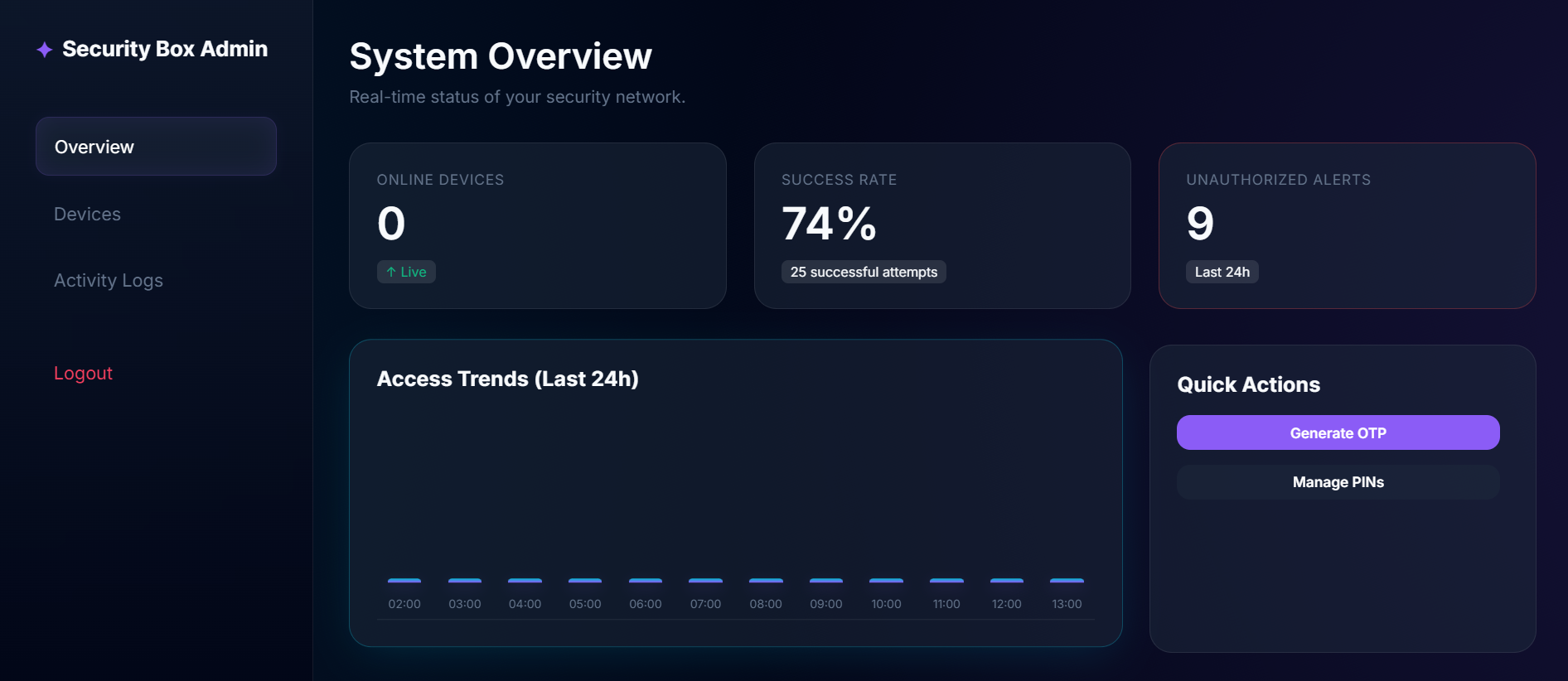
# Smart Security Box ## What I Built A cloud-connected IoT security system built around the ESP32 microcontroller. It features a physical keypad and LCD display for PIN entry, a solenoid lock for access control, and a live web dashboard for remote monitoring and management — all backed by a Flask API deployed on Render.com and a Supabase (PostgreSQL) cloud database. ## Why It Matters Traditional safes are offline and offer zero visibility. Smart alternatives are expensive and closed-source. This project bridges that gap — providing a **fully open, globally accessible** security system with real-time audit logs, dynamic OTPs, and an admin dashboard you can access from anywhere. ## How It Works The system runs on three layers: 1. **The Edge (Hardware)** — ESP32 reads keypad input and sends a secure HTTPS request to the cloud. Falls back to a Master PIN if offline. 2. **The Brain (Cloud API)** — Flask API verifies PINs against the database, manages OTPs, and tracks all access events. 3. **The Control Room (Dashboard)** — A glassmorphism web UI where admins log in to view live access charts, generate OTPs, and manage devices. ## Problems Encountered & Solutions | Problem | Solution | |---|---| | **Keypad Ghost Inputs**: GPIO conflicts caused missed or repeated key presses | Rewired Row 2: GPIO 2 → GPIO 27 and Col 2: GPIO 5 → GPIO 12 to eliminate hardware interference | | **Server Connectivity Failure**: ESP32 hung indefinitely when Wi-Fi dropped | Implemented a Heartbeat system + Offline Master PIN fallback | | **Complex Cloud Deployment**: Manual Python environment setup was error-prone | Wrote a `render.yaml` Infrastructure-as-Code file to fully automate the build | | **UX Friction**: Email login felt impersonal | Refactored entire auth system to use custom Usernames | ## Key Features - Dynamic OTP generation with expiry - Real-time access log with Chart.js trend visualization - JWT-secured admin dashboard - Offline fallback mode for uninterrupted access - Full audit trail of every PIN attempt (success or failure) ## What I Used and Why - **ESP32** — Built-in Wi-Fi, dual-core, handles real-time input without lag - **Flask (Python)** — Lightweight, fast API with minimal overhead - **Supabase (PostgreSQL)** — Scalable, secure, real-time cloud database - **JWT** — Stateless, secure admin session management - **Vanilla CSS (Glassmorphism)** — Custom premium aesthetic, no bloated frameworks - **Render.com** — Zero-config cloud deployment with free HTTPS ## Milestones 1. Hardware assembled and tested (Keypad + LCD + ESP32 + Lock) 2. ESP32 communicating with local Flask server 3. Data migrated to Supabase cloud database 4. Full web admin dashboard built with live charts 5. Deployed live on Render.com with global HTTPS access ## The Road Ahead - **Biometric Auth** — Fingerprint scanner for triple-factor security - **Mobile Alerts** — Telegram/WhatsApp push notifications on failed attempts - **Battery Mode** — ESP32 Deep Sleep for portable, long-term deployment - **Multi-Device** — Manage multiple boxes from one dashboard - **AI Threat Detection** — Flag unusual access patterns automatically ```javascript // Live Heartbeat Simulator const deviceId = "DEVICE_001"; let logs = []; function simulateHeartbeat() { const timestamp = new Date().toLocaleTimeString(); const status = Math.random() > 0.1 ? "✅ ONLINE" : "⚠️ WARNING"; logs.unshift(`[${timestamp}] ${deviceId}: ${status}`); if (logs.length > 5) logs.pop(); console.clear(); console.log("=== SMART SECURITY BOX MONITOR ==="); logs.forEach(log => console.log(log)); } setInterval(simulateHeartbeat, 3000); simulateHeartbeat();
```javascript // Simulating the Security Box Heartbeat Monitor const deviceId = "DEVICE_001"; let logs = []; function simulateHeartbeat() { const timestamp = new Date().toLocaleTimeString(); const status = Math.random() > 0.1 ? "✅ ONLINE" : "⚠️ WARNING (Latency)"; const entry = `[${timestamp}] ${deviceId}: ${status}`; logs.unshift(entry); // Add to the top // Keep only last 5 logs if (logs.length > 5) logs.pop(); console.clear(); console.log("=== SMART SECURITY BOX LIVE MONITOR ==="); logs.forEach(log => console.log(log)); console.log("\nNext check in 3 seconds..."); } // Start the simulation setInterval(simulateHeartbeat, 3000); simulateHeartbeat(); ```
 RAIN
RAIN